0x + 12 characters
for example: 0x0060b0c11102

Subject: How to determine the Hardware ID?
There are 4 different types of security devices for CoCreate licenses
New Devices
1) Network Card (LAN adress, mac address):
0x + 12 characters
for example: 0x0060b0c11102
2) MSU Security Device (red or yellow coloured)
MSU + 7 characters
for xample: MSU2002754

Old devices (not any more in use)
3) UNIX HIL ID-Module:
46084A + 10 characters
for example: 46084A 2944A29542

4) PC Dongle (grey coloured):
8485C + 10 characters
for example: 8485C 2910A04591
The Hardware ID must fit into one of the above formats.
General Commands to determine the Hardware ID
associated with the CoCreate License Server:
Windows
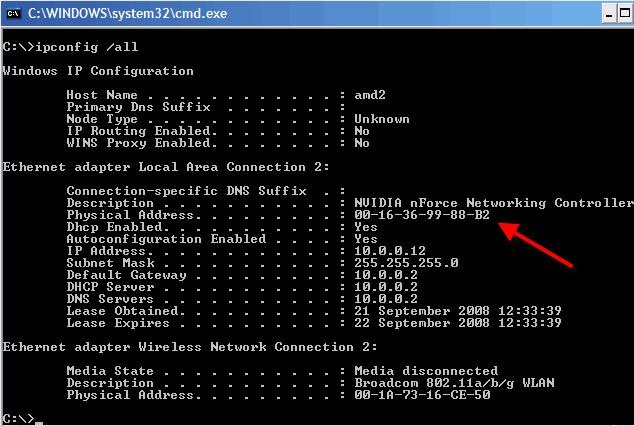
1. At DOS prompt type in [C:\> ipconfig /all]
Look at Physical Address for example 00-16-36-99-88-B2
insert 0x in front of number for example 0x0016369988B2
hp-ux (old)
1. type in 'lanscan'
or
2. type in 'landiag'
- then 'L' for land return
- then 'D' for display return
- look at 'Station Address'
- for example 0x0060b0c11102